We Built a Free Build Plate Optimiser for Print Farms, and You Can Use It Right Now
The Problem Every Print Farm Knows Too Well
If you run a print farm, you know the drill. A customer sends over a batch of STL files, maybe 15 different parts, some needing 20 copies each. You open Bambu Studio, start dragging parts onto build plates, manually rotating them for the best orientation, eyeballing the spacing, and repeating that process across every printer you own. It takes ages, and it's mind-numbingly repetitive.
We've been there ourselves. Running multiple Bambu Lab printers in-house, we found ourselves spending more time arranging build plates than actually printing. So we built a tool to fix it, and we're giving it away for free.
Introducing the BFGarage Build Plate Optimiser
Our Build Plate Optimiser is a browser-based tool that takes your STL files and does the heavy lifting for you. Upload your parts, pick your printers, and it will intelligently orient, distribute, and pack everything into ready-to-print 3MF files, one per printer, with as many plates as needed.
No downloads. No sign-ups. No cost. Just open it and go.
How It Works
1. Upload Your STL Files
Drag and drop your STL files straight into the browser. The tool parses each file instantly, extracting mesh data and calculating part dimensions. It handles both ASCII and binary STL formats, so whatever your CAD software exports will work.
2. Auto-Orient for Optimal Printing
This is where it gets clever. Enable auto-orientation and the tool analyses over 40 candidate orientations per part using an advanced algorithm based on Tweaker-3 and OrcaSlicer's orientation logic. It evaluates each candidate against multiple criteria:
- Overhang minimisation: reduces the need for support structures
- Bed adhesion: maximises the contact area with the build plate
- Stability: ensures parts won't topple during printing
- Print quality: accounts for first layer height and contour accuracy
The result? Each part is rotated into the orientation that will print best on an FDM machine, without you having to think about it.
3. Select Your Printers
The tool comes preloaded with configurations for the full range of Bambu Lab printers, from the compact A1 Mini right through to the H2D Pro. Select one printer or select several. The tool knows each printer's exact build volume and will respect those boundaries when packing.
4. Smart Distribution Across Printers
Running different printer models? The distributor algorithm works out the most efficient way to split your parts across them. It allocates proportionally based on each printer's bed area, so larger beds take on more of the workload. Parts that only fit on one specific printer are automatically routed there first.
5. Grid Packing with Adjustable Spacing
Parts are packed onto each build plate using a grid-based algorithm that places the largest parts first, filling rows left-to-right before moving to the next row. When a plate fills up, a new one is created automatically. You can fine-tune the gap between parts with an adjustable spacing slider, from 0 mm right up to 50 mm.
6. Visual Plate Preview
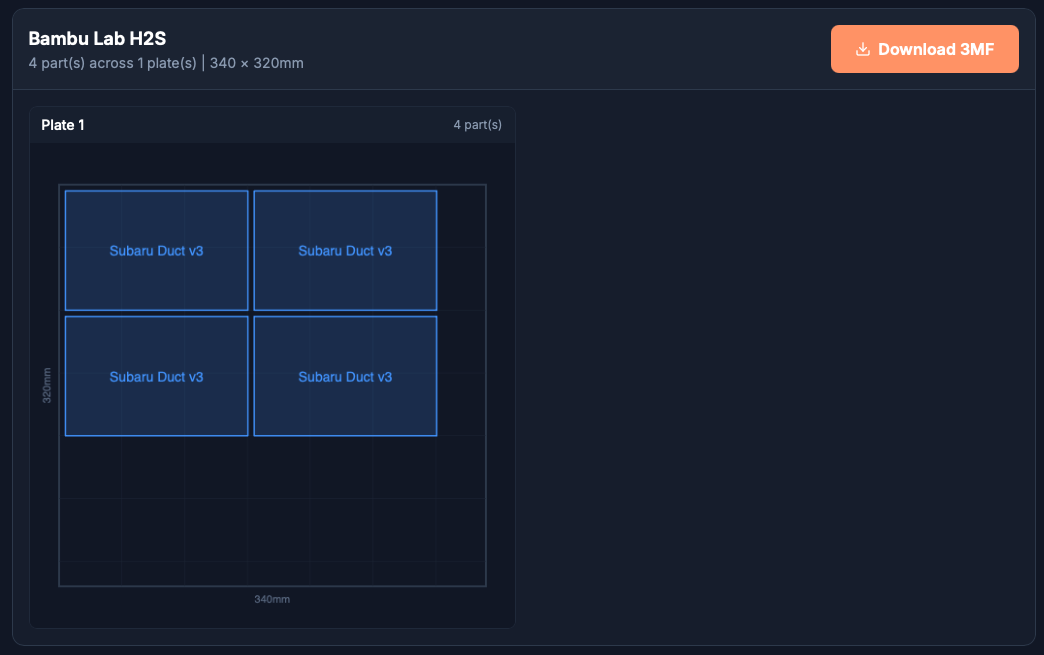
Every generated build plate gets a colour-coded 2D preview, drawn on a canvas with a 50 mm grid overlay for scale. You can see exactly where each part lands on the bed before committing to a print.
7. Download 3MF Files, Ready for Bambu Studio
Hit download and you get a fully formed 3MF file for each printer. Open it in Bambu Studio and every plate is laid out exactly as previewed. Parts positioned, plates separated, printer profile matched. Slice and send to your printer.
Why We Made It Free
We're a 3D printing and rapid prototyping company based in Leeds. We built this tool to speed up our own workflow, and it's saved us hours every week. But we also know that print farms of all sizes face the exact same bottleneck. Manually arranging build plates doesn't add value. It just eats into time you could spend on actual production.
Making the tool free was an easy decision. If it helps other print farms work faster, that's good for the entire 3D printing community. And if you ever need parts printed professionally, whether that's FDM, SLA, SLS, or CNC machining, we're always here to help.
Who Is This For?
- Print farm operators running multiple Bambu Lab printers who want to automate plate layout
- Small businesses using 3D printing in-house who want to maximise throughput
- Makers and hobbyists with a multi-printer setup who want to save time on batch jobs
- Anyone tired of manually arranging STL files on build plates
Try It Now
The Build Plate Optimiser is live on our website right now. Upload some STL files, pick your printers, and see how much time you could save on your next batch.
Got feedback or feature requests? We'd love to hear from you. Drop us a line at ben@bfgarage.co.uk.