Stop Waiting for Quotes: Get Instant 3D Printing Prices from Your CAD Files
The Quoting Problem Nobody Talks About
You've finished your design. The CAD file is ready. You just need to know what it'll cost to get it made. So you fill out a contact form, attach your file, and wait. Maybe you hear back in a few hours, maybe tomorrow, maybe never. If you're comparing suppliers, multiply that wait by three or four.
It's 2026. Getting a ballpark price for a 3D printed part shouldn't take longer than designing it.
Introducing InstaQuote
Our InstaQuote calculator gives you an instant price estimate the moment you upload your file. Pick your technology, choose a material, drag in your CAD files, and watch the price appear in real time. No account needed. No emails back and forth. Just upload and see.
It works for everything we offer, FDM, SLA, SLS 3D printing, laser cutting, and CNC machining, all from a single tool.
How It Works
1. Choose Your Technology and Material
Start by selecting what you need. The calculator supports five manufacturing technologies, each with a full range of materials:
- FDM 3D Printing: PLA, PETG, ABS, TPU, Nylon-CF, Nylon 12
- SLA 3D Printing: Standard, Tough, Flexible, Transparent, and High Temp resins
- SLS 3D Printing: Nylon 12, Nylon 11, Glass-Filled Nylon, TPU
- Laser Cutting: Plywood, acrylic, mild steel, and aluminium in multiple thicknesses
- CNC Machining: Aluminium 6061, mild steel, stainless steel, brass, Delrin, nylon
Every material shows its unit price upfront, so you can compare options before uploading a single file.
2. Upload Your CAD Files
Drag and drop your files straight into the browser. The tool accepts STL files for 3D printing, DXF for laser cutting, and STEP/STP files for CNC machining. Upload one file or upload twenty. It handles them all at once.
Here's the important part: your files never leave your browser. All the geometry parsing happens client-side using JavaScript and WebAssembly. Nothing gets uploaded to a server. Your designs stay private.
3. Watch the Price Calculate in Real Time
This is where InstaQuote earns its name. The moment your file is parsed, you see the price. No "we'll get back to you".
Behind the scenes, the calculator is doing proper geometry analysis on your actual design:
- For 3D printing (FDM, SLA, SLS): it calculates the true volume of your part in cm³ using the signed tetrahedra method, then multiplies by the material's price per cm³
- For laser cutting: it traces every line, arc, circle, and spline in your DXF to calculate the total cut length in metres, then applies the per-metre rate
- For CNC machining: it works out the bounding box volume (your stock size), subtracts the part volume to estimate material removal, factors in the material's removal rate and setup time, and gives you an estimated machining cost per hour
These aren't rough guesses based on file size. They're geometry-driven calculations based on the actual shape of your part.
4. Adjust Quantities and See Discounts Apply
Need 50 copies instead of one? Change the quantity on any file and the price updates instantly. The calculator applies automatic volume and batch discounts as your order grows:
- Volume discounts kick in as total material volume increases across your order
- Batch discounts apply when you're ordering multiple parts, scaling up to 15% off for larger runs
The pricing breakdown shows you exactly what discount you're getting and why, so there are no surprises.
5. Review Your Full Quote Summary
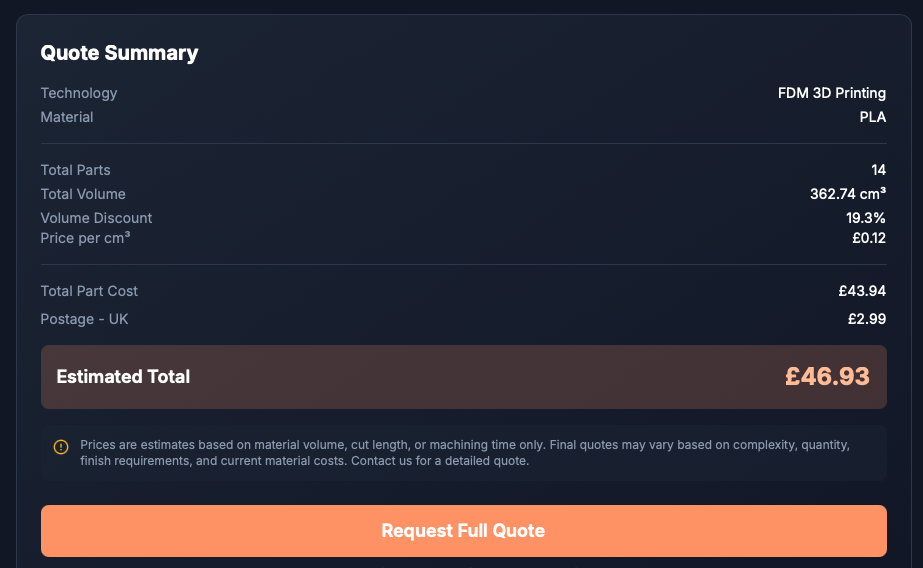
Before you go any further, the summary panel shows you everything in one place: technology, material, total parts, total volume or cut length, any discounts applied, part cost, postage, and the final estimated total. It's all transparent and itemised.
6. Request a Full Quote in One Click
Happy with the estimate? Hit "Request Full Quote" and the calculator hands everything off to our contact form automatically. Your technology, material, file details, quantities, and pricing are all pre-filled into the message, ready to send. You can add any special requirements (surface finish, tolerances, colour matching) before submitting.
No copy-pasting. No re-explaining what you need. One click and all the context is there.
Why We Built This
We're a rapid prototyping and manufacturing company based in Leeds. We work with engineers, product designers, and small manufacturers every day. The number one piece of feedback we kept hearing was: "I just want to know roughly what it'll cost before I commit to a conversation."
Fair enough. Traditional quoting puts all the effort on the customer: describe your project, then wait for someone to open your file and come back with a number. That process made sense when every job needed manual review, but for straightforward parts in standard materials, there's no reason you should have to wait.
InstaQuote gives you that instant answer. And when your project needs something more nuanced (complex geometries, specific tolerances, unusual materials), the "Request Full Quote" button connects you straight to our team with all the details already attached.
What Makes It Different
Most online 3D printing calculators make you create an account, upload files to their servers, and wait for processing. InstaQuote does none of that.
- No account required: open the page and start uploading
- Client-side processing: files are parsed in your browser, not on our servers
- Multi-technology: one tool for 3D printing, laser cutting, and CNC machining
- Real material pricing: not generic estimates, actual per-unit rates for every material we stock
- Transparent discounts: see exactly how volume and batch pricing affects your total
- Seamless handoff: quote data pre-fills the contact form so nothing gets lost
Who Is This For?
- Product designers who want to factor manufacturing cost into design decisions early
- Engineers comparing material and technology options for functional prototypes
- Small businesses getting budget estimates before committing to a production run
- Makers and hobbyists checking what a one-off print will cost before ordering
- Procurement teams gathering quick estimates across multiple manufacturing methods
Try It Now
The InstaQuote calculator is live on our website right now. Upload a file you're working on and see what it would cost to get it made in FDM, SLA, SLS, laser cut, or CNC machined.
If the estimate looks right, hit "Request Full Quote" and we'll have a detailed quote back to you within hours, not days.
Got questions? Reach out at ben@bfgarage.co.uk. We're always happy to talk through your project.